 MarsDawn
Mermaid preview on Mac.
Mermaid lets you write a diagram as text inside a Markdown file. Most editors show you the text. MarsDawn draws the diagram: in the preview next to the source, in Quick Look in Finder, and in the PDF you export.
Write the diagram as text
Put the diagram in a code block marked mermaid:
```mermaid
flowchart LR
    Write[Write Markdown] --> Preview[Live preview]
    Preview --> Export{Share it?}
    Export -- PDF --> PDF[File ▸ Export as PDF…]
    Export -- Print --> Print[File ▸ Print…]
```
In MarsDawn that block becomes a flowchart: Write Markdown, then Live preview, then a Share it? choice that leads to PDF or Print.
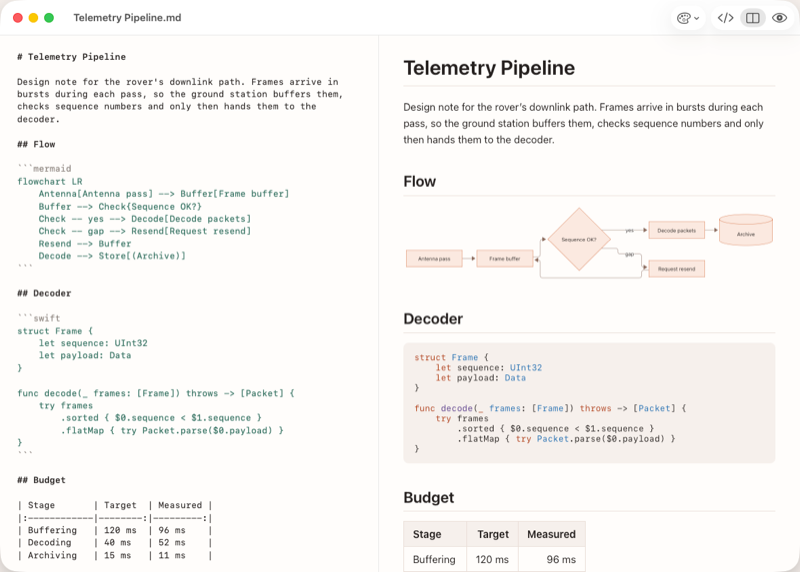
Where the diagram is drawn
- In the preview. Open the file and the diagram sits next to its source (⌘2). The page updates as you type, and the two panes scroll together.
- In Quick Look. Select the file in Finder and press Space; diagrams are drawn there too.
- In the PDF. File ▸ Export as PDF… and File ▸ Print… draw the diagram into the page. Page breaks avoid cutting a diagram in half. The PDF uses the theme's light colors.
- From the command line. The free
marsdawn exporttool draws the same diagrams into a PDF, and does not need the app. See Command Line. - In your theme. The preview's Appearance setting applies to diagrams too, so a diagram follows light or dark.
When the diagram has a mistake
If Mermaid can't draw a diagram, the preview shows the diagram's source with the full error message underneath. When the error names a line, click the message and the editor jumps to that line. marsdawn export --json reports failed diagrams in diagramErrors, so a script or an agent can tell that a diagram didn't draw.
What to know
- You edit the Mermaid text. There is no visual diagram editor, and you can't drag boxes in the preview.
- Which diagram types draw depends on the Mermaid version inside the app. MarsDawn 1.1.0 includes Mermaid 12.0.0. The kit's export tests render documents for flowcharts, sequence, class, state, entity-relationship, Gantt, pie, mindmap, journey, timeline and git graphs, among others.
- MarsDawn has no AI model, so it doesn't write a diagram for you. The flowchart template has a prompt you can hand to your own agent.
Next
- Start from a diagram that already works: the flowchart template.
- Export it: PDF export, or from a script, Command Line.
- Not sure how to open the file? How to open .md files on Mac.
Try it on your Mac
MarsDawn is free to download. Try everything for 14 days, then unlock it once for USD 4.99. No subscription, no account. It needs macOS 26 or later.