 MarsDawn
Everything MarsDawn does, on one page.
MarsDawn is a Markdown editor for the Mac. You write on one side and read the rendered page on the other, with diagrams, math and code drawn in. It has no AI model of its own: it is built for reading what an agent wrote, and for writing your own. And when the work moves to a table, a meeting or a filing cabinet, it prints and exports clean pages.
Each section below says what the app does and links to the page that goes deeper.
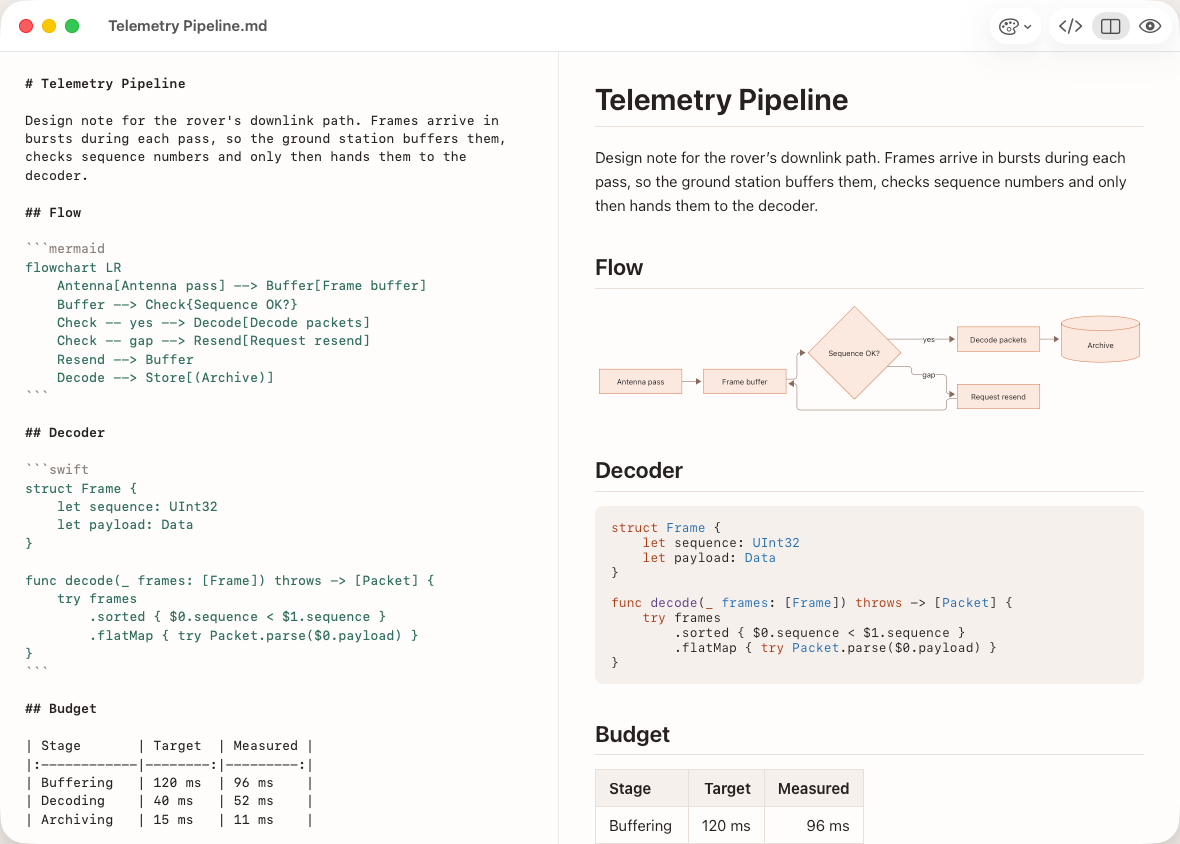
- A native Mac window.
- The Mac's text editor, with Markdown highlighting.
- ⌘1 source, ⌘2 split, ⌘3 preview.
- The page updates as you type.
Read what your agent wrote
Source and preview, side by side
Open a Markdown file and read the rendered page next to its source (⌘2), or switch to source only (⌘1) or preview only (⌘3). The two panes scroll together, and the page updates as you type.
Outline and Files sidebar
The sidebar's Outline tab lists a document's headings; click one to jump there. Open a folder and the Files tab lists what is in it, and new files appear on their own while an agent is writing into it. If the folder is a git checkout, the header names the branch or worktree.
Reading what your agent hands back
Point at the exact line
Edit ▸ Copy Reference copies your place as a path and line, like docs/plan.md:42. Copy for AI adds the selected text under it. Paste either into the agent's chat.
Reading what your agent hands back
Follow links between files
Click a link to another Markdown file in the preview and MarsDawn opens it, or brings it forward if it is already open, and scrolls to the heading.
On paper, among people
Not all of the work happens on a screen. The pages MarsDawn prints and exports are the ones you read on screen, so they work where people meet, read and keep records.
In the meeting
Print the pages, or send everyone the same PDF, and the whole table works from the same document instead of one shared screen. Everyone holding the same file has the same page breaks, so "the table on page 3" points at one thing. Then the people write the decisions down, on the printout or in notes. The meeting-notes template starts with decisions and gives each action item an owner.
PDF export · Meeting notes template
Reading with a pen
Some people take things in better with a pen: underlining, writing in the margin, so it sticks. Print the document and do that on paper. MarsDawn has no annotation tool of its own, so if you would rather mark up the PDF, use the PDF app you already have.
Paper records
Some fields still file paper, accounting among them. MarsDawn makes no archival or compliance claim. What it does is print and export clean, paginated pages: diagrams drawn in, short code blocks kept whole, the theme's light colors. Use them wherever paper is still the record.
Handing it to someone who doesn't use Markdown
A PDF opens in anything and needs no Markdown knowledge, so it is also the one to send a manager or a client.
Write and lay out
Plain Markdown, highlighted
Bold, italic, strikethrough, inline code, links, block quotes and task lists all work. The editor colors Markdown syntax, and the colors match your preview theme.
Zoom, line numbers and a status bar
Zoom the source and preview together from 50% to 300%. A line-number gutter runs beside the source, and the status bar shows your line and column, plus word and character counts and reading time for the document or your selection.
Images
Save the document, then drop or paste an image into the editor. MarsDawn copies it into an assets folder next to the document and writes the link. Images from the web stay hidden until you click Load Images, so opening a document never tells a server you read it.
Your writing stays on your Mac
Front matter stays out of the way
A front matter block at the top of a file shows as a collapsed Document info section in the preview and Quick Look, and is left out of the PDF.
Eight languages
The app is in English, Traditional Chinese, Simplified Chinese, Japanese, German, French, Spanish and Korean.
Diagrams, code and math
Mermaid diagrams
A fenced code block marked mermaid is drawn as a diagram. If the diagram has a mistake, the preview shows its source with the error underneath, and clicking the message jumps to that line.
Highlighted code
Code blocks are highlighted for most common languages. Name the language after the opening fence.
Math
Math written in KaTeX syntax is drawn in the preview and in Quick Look, and comes through in the exported PDF.
Why AI output still needs a human reader
Themes, PDF and print
Four themes, light and dark
Dawn, Classic, Modern and Vivid each come in a light and a dark version, and MarsDawn follows your Mac's appearance unless you pick one in Settings. Choose from View ▸ Preview Theme or the palette button in the toolbar.
More themes
Settings ▸ Appearance ▸ Get More Themes… opens a gallery of extra preview themes. Install one and it shows up under View ▸ Preview Theme; Remove takes it away again. The gallery only goes online while it is open.
Export as PDF, or print
File ▸ Export as PDF… saves a paginated PDF, and File ▸ Print… prints the same pages. Mermaid diagrams are drawn in, code keeps its highlighting, and page breaks avoid splitting a heading from its section or cutting a short code block or diagram in half. The PDF always uses the theme's light colors, even if you were reading in dark.
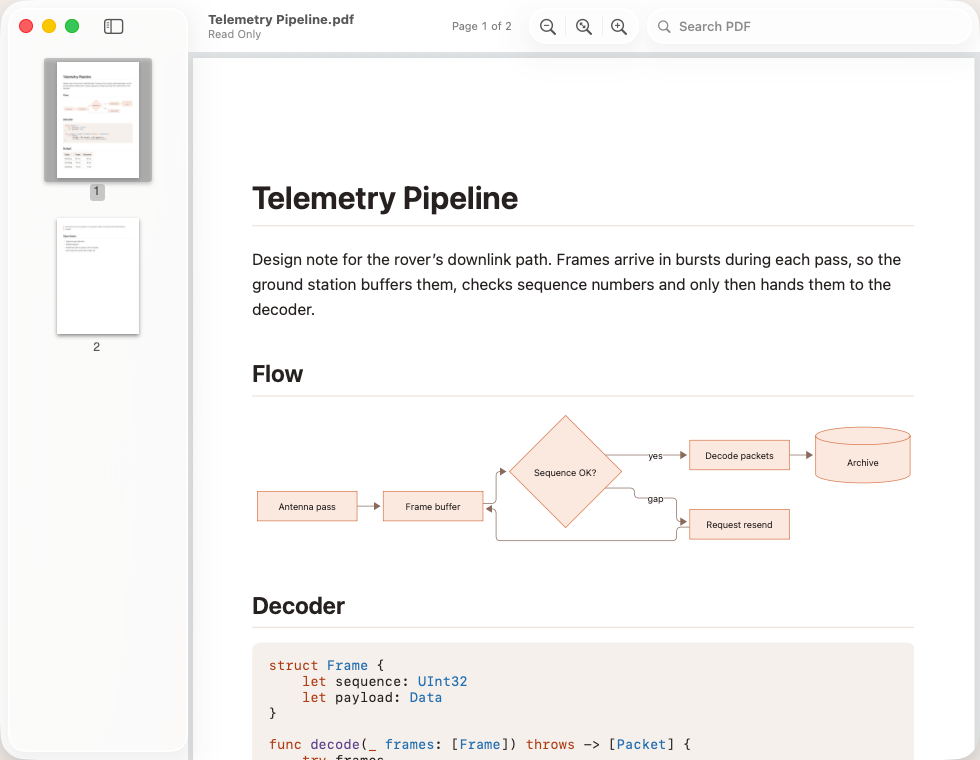
- Mermaid diagrams, drawn into the PDF.
- Code keeps its highlighting.
On your Mac, and on the go
Your agent works on the Mac. Its plans and reports can come with you on your iPhone or iPad.
- On the Mac: save the agent's plans and reports in a folder your cloud syncs, such as iCloud Drive.
- On iPhone or iPad: in MarsDawn, tap Open and pick the same file. Mermaid diagrams, math, code and tables are rendered, with an outline and your theme.
- Back on the Mac: keep editing, or export a PDF.
With the same Apple Account, one trial and one unlock cover MarsDawn on Mac, iPhone and iPad.

On iPhone and iPad, MarsDawn is for reading: it doesn't edit, export PDFs or sync. Your files get to your phone through the cloud you already use; MarsDawn has no sync of its own.
Files, tabs and Quick Look
Windows and tabs
Each document opens in its own window. Choose Window ▸ Merge All Windows to gather open windows as tabs of one. Autosave runs as you type.
Quick Look in Finder
Select a Markdown file in Finder and press Space to read it rendered, diagrams included. Quick Look uses the theme you picked in MarsDawn and follows its Appearance setting.
A Mac app · Quick Look for Markdown
Other files
MarsDawn also opens plain text files (.txt, .log, source code) and PDFs. UTF-8 text opens ready to edit, as source only. PDFs open in a viewer with page thumbnails, zoom and search.
Your files stay yours
There is no account, no sync and no cloud. Documents stay where you save them, and MarsDawn collects no data about you.
Your writing stays on your Mac
For agents and scripts
A free command-line tool
The free marsdawn tool is installed separately with Homebrew. marsdawn export turns a Markdown file into a PDF, rendered like MarsDawn's preview; it does not need the app. Choose a theme with --theme and paper size A4 or Letter. marsdawn open opens files in the app for you to review, optionally at a line, and does need the app installed.
Output a script can read
Add --json and both commands return a result an agent or script can parse.
Skill and MCP server
An agent skill file teaches a coding agent to open what it wrote in MarsDawn for your review. For clients without a shell, a separate MCP server runs the same export.
No AI inside
MarsDawn has no AI model of its own. It won't summarize or grade what an agent wrote; it keeps a long, changing file readable so you can do the reading.
Siri and Shortcuts
Search for MarsDawn in the Shortcuts app to find three actions: New Markdown Document (from a template), Add Note to Inbox and Open Recent Document. Notes go to Inbox.md in the folder you choose in MarsDawn ▸ Settings… ▸ Notes Folder.
After the page is printed
A meeting around printed pages, a pen in the margin, a paper record on file.
Try it on your Mac
MarsDawn is free to download. Try everything for 14 days, then unlock it once for USD 4.99. No subscription, no account. It needs macOS 26 or later.
How the trial works: Try free, pay once. What is left out on purpose: What MarsDawn doesn't do.