 MarsDawn
Frontier tools for builders
Claim the map. Read the dawn.
Markdown for humans who steer agentic work.
Write on the Mac, read on iPhone and iPad
Requires macOS 26, iOS 26 or iPadOS 26 or later
MarsDawn is a native Mac app for reading and reviewing Markdown, with live split preview, Mermaid diagrams, KaTeX math, Quick Look and PDF export, free to try for 14 days and USD 4.99 once to unlock.
# Welcome to MarsDawn

## Layouts

| Shortcut | Layout |
|:--------:|:-------|
| ⌘1 | Source only |
| ⌘2 | Source and preview side by side |
| ⌘3 | Preview only |

## Writing

**Bold**, *italic*, ~~strikethrough~~, `inline code` and [links](https://marsdawn.southern-light.dev/support/) all work as you'd expect.

> Block quotes stand out with a warm rule.

- [x] Task lists with checkboxes
- [ ] Nested lists
  - like this one
Welcome to MarsDawn
Layouts
| Shortcut | Layout |
|---|---|
| ⌘1 | Source only |
| ⌘2 | Source and preview side by side |
| ⌘3 | Preview only |
Writing
Bold, italic, strikethrough, inline code and links all work as you’d expect.
Block quotes stand out with a warm rule.
- Task lists with checkboxes
- Nested lists
- like this one

Watch the film
Read what your agent wrote.
- The agent writes. Your coding agent or writing assistant drafts the Markdown: a README, a spec, a set of notes.
- You review in MarsDawn. Open the file and read it rendered, with Mermaid diagrams and highlighted code, next to the source.
- The agent revises. Ask for changes. Open the revised file and read it the same way.
How to review what your agent hands back · How to open a .md file on a Mac
Review an agent's plan before it runs.
Catch the step that's out of order, point at its line, and hand it back.
- See what changed: when the agent saves the plan, the open window updates from disk in one step you can undo.
- Jump to the line: marsdawn open plan-checkout-v2.md:10 lands the window on line 10 and flashes the matching block.
- Send it back: Copy Reference (⌥⌘C) copies plan-checkout-v2.md:10; paste it into the agent's chat with your note.
Do this now
The free marsdawn command-line tool is ready today. Install it with Homebrew:
brew install redtear1115/tap/marsdawnmarsdawn exportturns a Markdown file into a PDF, rendered like MarsDawn's preview. It doesn't need the app.marsdawn openopens files in the MarsDawn app for you to review.--jsongives scripts and agents results they can parse.
Command Line · marsdawn for agents · Agent skill · MCP server
Know before you buy. What MarsDawn doesn't do
How the pieces fit
What each part does today, as of MarsDawn 1.1.1, marsdawn 0.6.4 and marsdawn-mcp v0.2.4.
| Capability | In the app | CLI | MCP / skill | Status |
|---|---|---|---|---|
| Open at a line | Lands on the line, flashes the preview block | marsdawn open notes.md:120 (--background keeps focus) | open_in_marsdawn; the skill opens once | Shipped |
| PDF export | File ▸ Export as PDF… (⌥⌘E) | marsdawn export, no app needed | export_markdown_to_pdf; skill | Shipped |
| JSON result | — | --json on open and export | MCP returns the same JSON | Shipped |
| Agent skill | — | marsdawn skill --install | Teaches open once and export | Shipped |
| MCP server | — | Runs underneath | marsdawn-mcp: two tools, allowed folders only | Shipped |
| Copy for AI, Copy Reference | Edit ▸ Copy for AI (⌃⌥⌘C), Copy Reference (⌥⌘C) | — | — (paste into any agent) | Shipped |
| Live reload | Takes the saved change, one Undo | — | Skill: don't open again | Shipped |
| Claude Code hook | — | Uses open --background | Hook script from /cli/agents/ | Documented, opt-in |
Shipped: in the released version named above. Documented, opt-in: instructions on this site that you add yourself; not inside the tool. Planned: not built yet; no date. Planned: a folder option in the MCP open_in_marsdawn tool. More options, such as --folder, are on Command Line.
If you build Mac apps with a coding agent
For indie Mac developers: how your agent can open what it wrote in MarsDawn today.
| Tool | How it pairs | Set up |
|---|---|---|
| Claude Code | The skill has it open what it wrote, once, at the line: marsdawn open plan.md:42. An opt-in hook opens each .md it writes, in the background | marsdawn skill --install; the hook script from /cli/agents/ |
| Codex, Cursor, Xcode | No setup guide yet. Anything that runs a shell command can call marsdawn open file:line --json; an agent that loads instruction files can use SKILL.md (--dir), and an MCP-only client can use marsdawn-mcp | brew install redtear1115/tap/marsdawn |
The hook and the commands: marsdawn for agents · Agent skill · What MarsDawn doesn't do
Choosing between MarsDawn, VS Code's preview, Obsidian, QLMarkdown and LynxOffice? The comparison lists what each vendor states, what MarsDawn lacks, and when you don't need it. Compare
Your documents stay on your Mac
On your Mac. Reading, editing, rendering, PDF export and the marsdawn command line all run here, offline; the app never uploads your documents.
More: Privacy Policy
Off the network by default. Web images load only when you click Load Images or turn on Load remote images automatically in Settings, and an HTML document opens static, with its code not run.
More: Privacy Policy
Leaves only when you choose. Copy for AI puts text on your clipboard for you to paste; a theme download, a document you run with View › Run This Document, and the agent you let read a file go out only on your say.
More: Privacy Policy
Questions and answers
What is MarsDawn?
MarsDawn is a native Mac app for reading and reviewing the Markdown your agent wrote, with the source beside a live preview. It draws Mermaid and KaTeX, previews .md files in Quick Look and exports PDF, and you can edit the source too.
Is MarsDawn a subscription?
No. MarsDawn is a free download with a 14-day trial of every feature. After that, a single in-app purchase of USD 4.99 unlocks it for good. Nothing renews, and there is no account.
Does MarsDawn work on iPhone or iPad?
Yes, for reading. On iPhone and iPad, MarsDawn opens Markdown files and renders Mermaid diagrams, math, code and tables, with an outline and themes. It doesn't edit, export PDFs or sync. It needs iOS 26 or iPadOS 26 or later. With the same Apple Account, one trial and one unlock cover MarsDawn on Mac, iPhone and iPad.
More: Roadmap
Can Claude Code open files in MarsDawn?
Yes. The free marsdawn command-line tool has an open command that opens a Markdown file in MarsDawn, so Claude Code, or any agent that can run a shell command, can call it. An opt-in Claude Code hook can open each Markdown file Claude writes or edits.
Does MarsDawn upload my documents?
No. The app never uploads your documents, collects no data about you and has no account; your documents and settings stay on your Mac. If a document refers to the web and you load that content, your Mac fetches it from the servers that host it, and MarsDawn's developer receives none of it.
More: Privacy Policy
With MCP or the skill, who can see my files?
MarsDawn itself sends nothing. The skill is a text file of instructions, and the marsdawn CLI and the MCP server run on your Mac; the MCP server works only in folders you allow. The one reading your files is your agent, and what it and its model provider do with them is that agent's policy, which MarsDawn neither controls nor describes.
More: MCP
Is it safe to open HTML someone sent me?
By default it opens static: its code doesn't run and nothing loads from the web. If you choose View › Run This Document, that document runs, and it can send data over the network and read images, stylesheets, fonts and media in its folder. The choice is never remembered, so it opens static again next time.
More: Privacy Policy
Is the site's analytics cookie related to the app?
No. The app and this website are separate: the app collects nothing, and a visit can be recorded only on marsdawn.southern-light.dev. The site's Google Analytics starts denied and sets cookies only after you choose Accept; Cookie settings in the footer changes that. The app's requests for theme files under /themes/ are skipped.
More: Privacy Policy
Why use MarsDawn instead of another app?
You may not need it. If you mostly write your own notes, a notes app such as Obsidian fits better. If you live in VS Code, its built-in preview is free. If you only want to peek at files in Finder, a free Quick Look extension is enough. If your PDFs need page numbers, MarsDawn doesn't add them. MarsDawn is for reading and reviewing Markdown an agent wrote: the source beside a live preview, a change from your agent you can undo in one step, and a file opened at the exact line. If it doesn't suit you, write and tell us why.
More: How MarsDawn compares · Best Markdown viewer for Mac
Will MarsDawn keep being maintained?
Yes. Every update since MarsDawn arrived on the Mac App Store is in the changelog, and since 28 October 2026 MarsDawn is also on iPhone and iPad, for reading. MarsDawn's rendering core and the free marsdawn command-line tool are already open source under the Apache-2.0 license, in mars-dawn-kit. And if MarsDawn's developer ever stops maintaining the app, the app's own source code will be published under an open-source license, so others can keep it going.
More: Changelog · Roadmap · mars-dawn-kit
The app, as it is
A Mac app
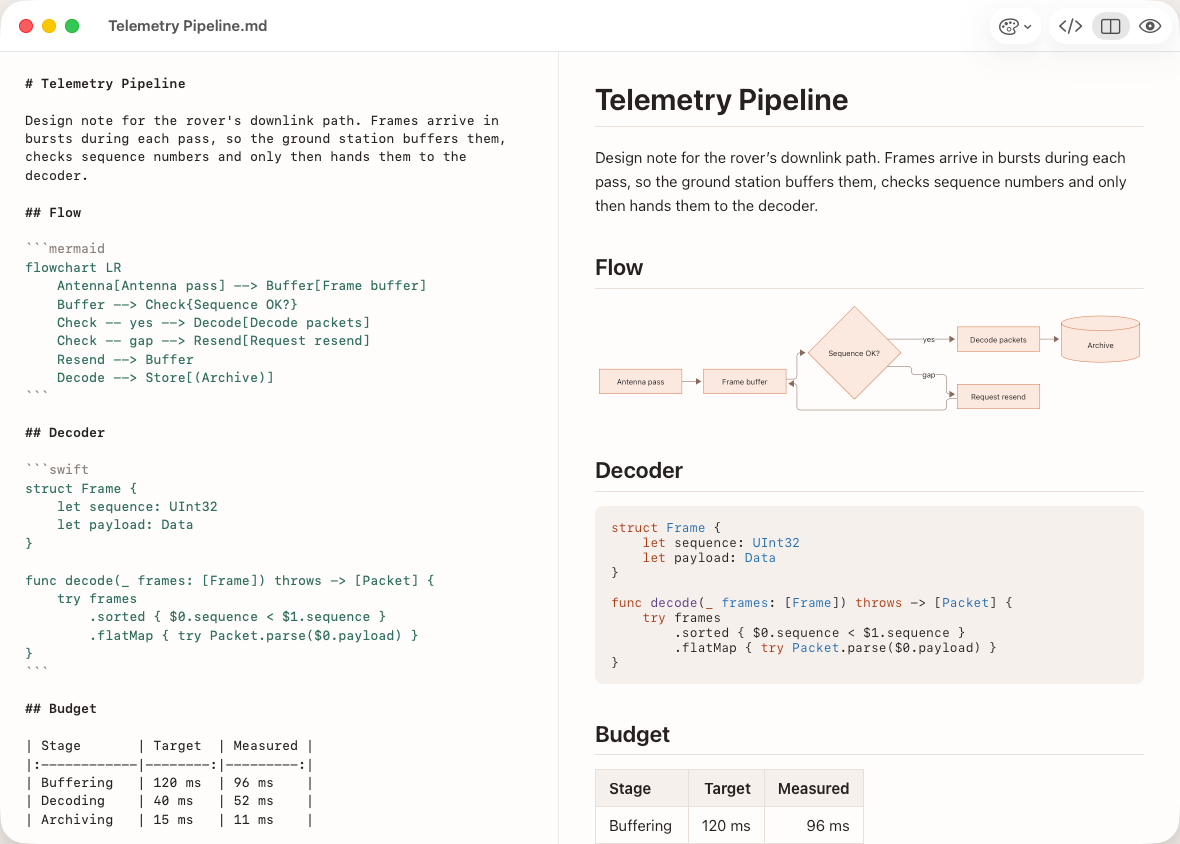
- A native Mac window.
- The Mac's text editor, with Markdown highlighting.
- ⌘1 source, ⌘2 split, ⌘3 preview.
- The page updates as you type.
PDF export
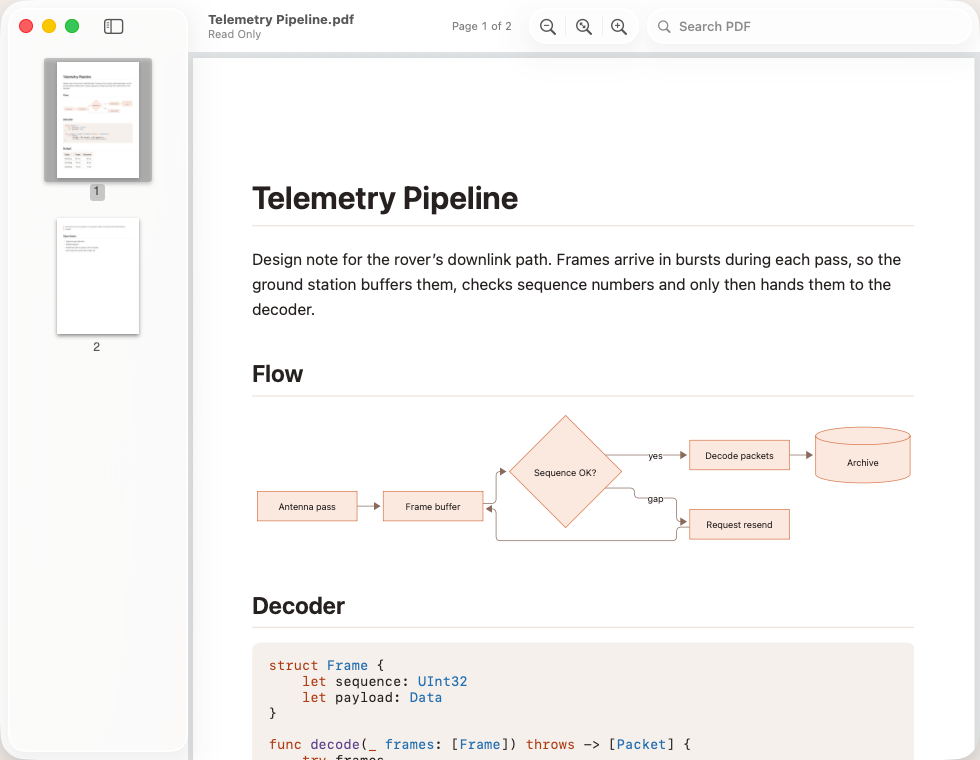
- Mermaid diagrams, drawn into the PDF.
- Code keeps its highlighting.
A new dawn for Markdown. MarsDawn is on the Mac App Store.