 MarsDawn
Markdown to PDF on a Mac, from the command line.
The free marsdawn tool turns a Markdown file into a PDF with one command. Tables, math, Mermaid diagrams and highlighted code come out the way they read in the source, and it needs nothing else installed, not even the MarsDawn app.
Install it
brew install redtear1115/tap/marsdawn
marsdawn --version
On an Apple silicon Mac, Homebrew installs a prebuilt copy in seconds. On an Intel Mac it builds from source instead, which takes a few minutes and needs Xcode 26 or later. It runs on macOS 15 or later, and marsdawn --version prints the version you got.
Save a document
Paste this into a file named plan.md:
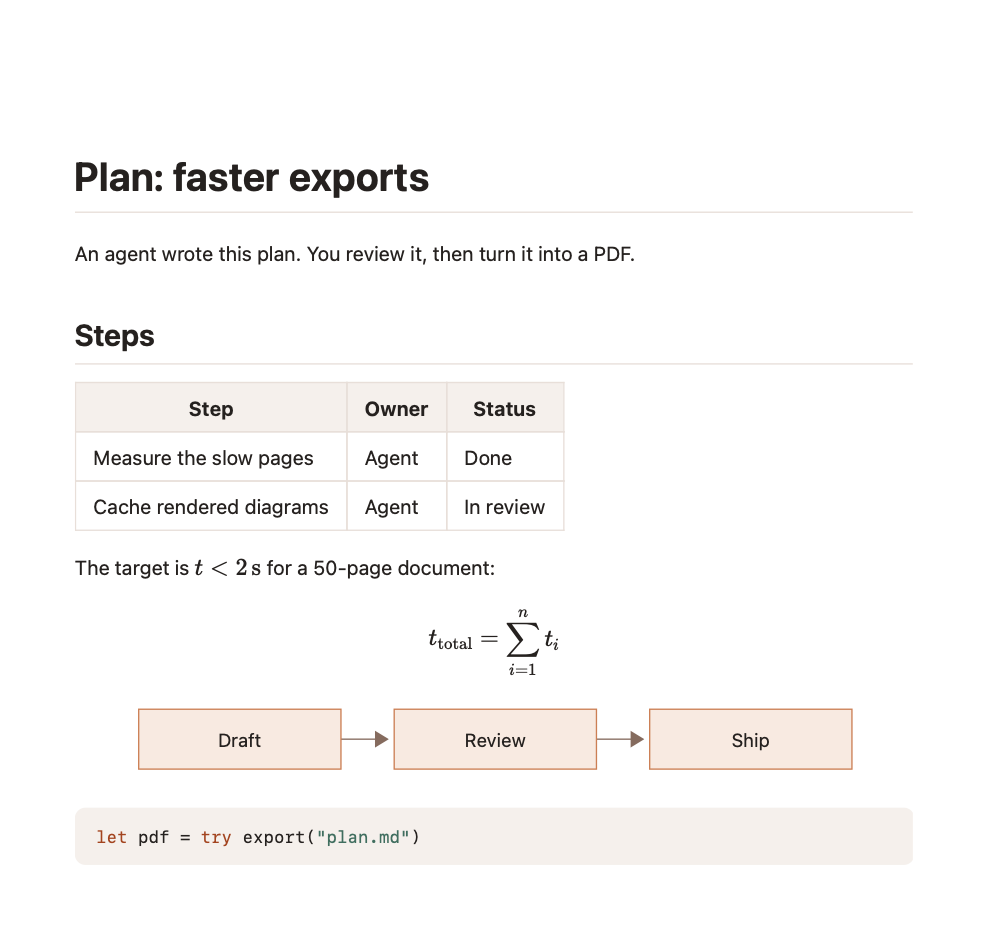
# Plan: faster exports

An agent wrote this plan. You review it, then turn it into a PDF.

## Steps

| Step | Owner | Status |
|------|-------|--------|
| Measure the slow pages | Agent | Done |
| Cache rendered diagrams | Agent | In review |

The target is $t < 2\,\text{s}$ for a 50-page document:

$$
t_{\text{total}} = \sum_{i=1}^{n} t_i
$$

```mermaid
graph LR
  Draft --> Review --> Ship
```

```swift
let pdf = try export("plan.md")
```
Export it
marsdawn export plan.mdIt writes plan.pdf next to the source and prints where it went:
Exported /Users/you/plan.pdf (1 page)This is that page, captured from a real run of marsdawn 0.5.0:
Choose a theme, paper size and file name
marsdawn export plan.md --theme classic --paper letter -o handout.pdf--theme: dawn, classic, modern or vivid, in the theme's light colors. Without it,exportuses$MARSDAWN_THEME, then dawn.--paper: a4 or letter. The default is a4.-o: where to write the PDF, instead of next to the source.--allow-remote-images: load images from the web while rendering. They stay off unless you pass it.
If it doesn't work
A full installation of Xcode.app 26.0 is required to compile this software.Homebrew is buildingmarsdawnfrom source, as it does on an Intel Mac. Install Xcode 26 or later from the App Store, then run the install again.marsdawn: No such file: …The path doesn't point at a file. Check the name, or run the command from the folder the file is in.… already exists. Pass --force to replace it.A PDF with that name is already there. Add--forceto replace it, or-oto write it somewhere else.Error: The value '…' is invalid for '--theme <theme>'.The theme or paper size isn't one it knows. The themes are dawn, classic, modern and vivid; the paper is a4 or letter.
Next
- Every option and the JSON it prints: Command Line.
- To have a coding agent do this for you, run
marsdawn skill --installto add the marsdawn agent skill. - All four preview themes, and where PDF export is headed: preview themes and PDF export.
- Handing the PDF to someone who doesn't use Markdown: sharing a PDF.